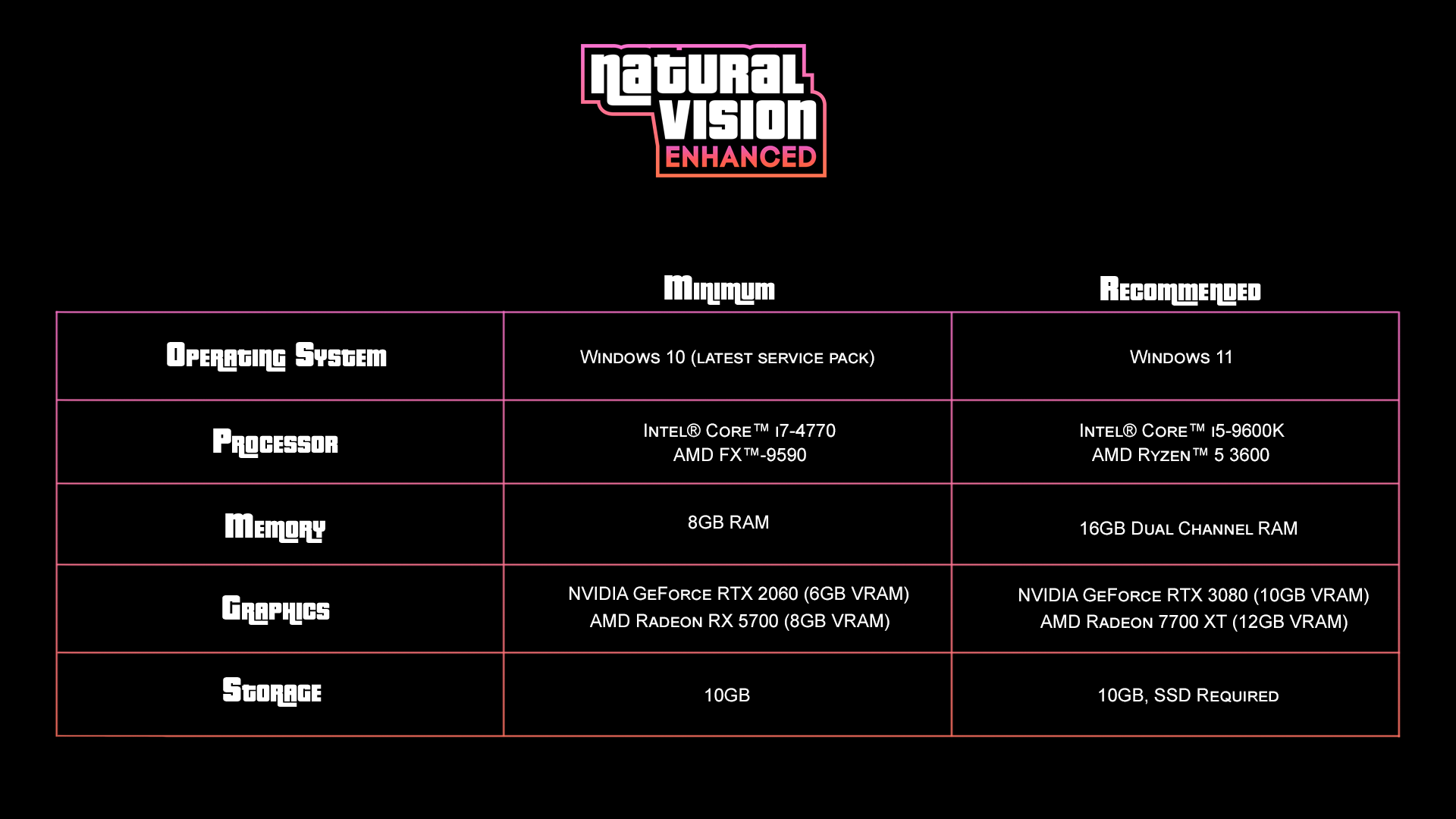
> For the complete documentation index, see [llms.txt](https://docs.razedmods.com/llms.txt). Markdown versions of documentation pages are available by appending `.md` to page URLs; this page is available as [Markdown](https://docs.razedmods.com/razed-mods-cfx-marketplace/naturalvision-enhanced/install-guide.md).
# Install Guide
## Requirements and General Information
#### Recommended Specs
## Getting Ready
{% hint style="danger" %}
You will need to download the [latest version of ScripthookV from here](https://dev-c.com/gtav/scripthookv).
{% endhint %}
{% hint style="info" %}
Before we begin, make sure your game folder is clean and you do not have any other visual mods installed.
{% endhint %}
## Install Instructions
{% stepper %}
{% step %}
#### Base Game
Get a clean copy of Grand Theft Auto V Enhanced without any mods installed. Make sure you only have ScripthookV installed
{% endstep %}
{% step %}
#### Main Package
Open the "Main Package" folder within the "NaturalVision Enhanced - Single Player Package" folder.
{% endstep %}
{% step %}
#### Installing NVE
Right-click and copy the all files and folders from inside this directory.
\
Paste these files and folders into your clean Grand Theft Auto V Enhanced game directory. Replace all files / folders if prompted.
{% endstep %}
{% step %}
### Disabling BattlEye
You will need to disable BattlEye Anti-Cheat in order to use mods in GTAV. See below for instructions on disabling it.
\
**Disabling BattlEye on Steam:**
* Go to your Steam library
* Right-click 'Grand Theft Auto V Enhanced'
* Go to the 'Properties' tab
* Under 'Selected Launch Option' type -nobattleye in the box
\
**Disabling BattlEye on the Rockstar Games Launcher:**
* Go to the Rockstar Games Launcher and select 'Grand Theft Auto V Enhanced'. Do not click play.
* Click on 'Settings' within the Grand Theft Auto V launcher tab. It should be a button in the corner.
* Uncheck 'BattlEye' to disable it
\
**Disabling BattlEye on the Epic Games Launcher:**
* Go to your Epic Games library
* Right-click 'Grand Theft Auto V Enhanced'
* Go to the 'Manage' tab
* Enable 'Launch Options' and type -nobattleye in the box
{% endstep %}
{% endstepper %}
## Post-install
We're done installing NaturalVision Enhanced! Before starting your game, read the sections below for additional information.
## Settings Tips
* Set GTAV PostFX and Particles Quality to "Very High" or "Ultra" for shaders and effects to work properly.
* Set GTAV Shader Quality to "Very High".
* We also recommend turning on Ray Tracing and changing the In-Game Depth of Field Effects quality to "Normal".
## ReShade Tips
* Open the ReShade menu with the INSERT key and go to the "NVE" tab.

* Under the "Graphics" tab, you can adjust increased raytracing settings.
* Under the "Trainer" tab, you can spawn vehicles and change weather.
* In "Freecam" mode, you can use the arrow keys on your keyboard to change the field of view (FOV) and rotate the camera.
## Display Brightness Tips
{% hint style="info" %}
It is very important for you to set the correct brightness level. Otherwise you won't see certain details properly.
Try to keep your GTAV display brightness at 50% for the best possible experience.
You can copy my settings below. Keep in mind they're based on my own monitor's brightness settings.
To get the best possible results, I suggest reading [this guide](https://geforce.com/whats-new/guides/how-to-calibrate-your-monitor) and calibrating your monitor's display settings.
Alternatively, you can take all the tests on the top of [this page](http://www.lagom.nl/lcd-test/contrast.php) and calibrate your monitor as you go along.
{% endhint %}
The Rockstar logo MUST be visible.
{% hint style="info" %}
Try to match colors, contrast and gamma with the picture below. \
\
**Weather:** ExtraSunny\
**Time:** 18:00\
**Location:** Del Perro Pier
{% endhint %}
If colors, contrast and gamma do not match, adjust your display settings.